|
Bienvenue
visiteur !

|
Statistiques
Liste des
membres
Contact
Mentions légales
651 connectés actuellement
29436597 visiteurs
depuis l'ouverture
2675 visiteurs
aujourd'hui



Partenaires


Tous nos partenaires
Devenir
partenaire
|

❤ 0 Auteur : Syvkal
Logiciel : RPG Maker VX
Nombre de scripts : 1
Source : https://save-point.org/thread-2386-post-1730.html#pid1730
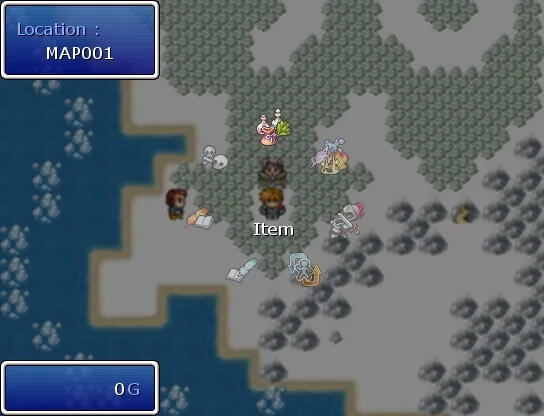
Installation
Vous aurez besoin d'images pour faire fonctionner le script, une appelée Icon_Disable plus celles dont le nom est indiqué à partir de la ligne 40.
Par exemple :        
Utilisation
Les endroits où il est possible de configurer des choses sont indiquézs dans le script.
1
2
3
4
5
6
7
8
9
10
11
12
13
14
15
16
17
18
19
20
21
22
23
24
25
26
27
28
29
30
31
32
33
34
35
36
37
38
39
40
41
42
43
44
45
46
47
48
49
50
51
52
53
54
55
56
57
58
59
60
61
62
63
64
65
66
67
68
69
70
71
72
73
74
75
76
77
78
79
80
81
82
83
84
85
86
87
88
89
90
91
92
93
94
95
96
97
98
99
100
101
102
103
104
105
106
107
108
109
110
111
112
113
114
115
116
117
118
119
120
121
122
123
124
125
126
127
128
129
130
131
132
133
134
135
136
137
138
139
140
141
142
143
144
145
146
147
148
149
150
151
152
153
154
155
156
157
158
159
160
161
162
163
164
165
166
167
168
169
170
171
172
173
174
175
176
177
178
179
180
181
182
183
184
185
186
187
188
189
190
191
192
193
194
195
196
197
198
199
200
201
202
203
204
205
206
207
208
209
210
211
212
213
214
215
216
217
218
219
220
221
222
223
224
225
226
227
228
229
230
231
232
233
234
235
236
237
238
239
240
241
242
243
244
245
246
247
248
249
250
251
252
253
254
255
256
257
258
259
260
261
262
263
264
265
266
267
268
269
270
271
272
273
274
275
276
277
278
279
280
281
282
283
284
285
286
287
288
289
290
291
292
293
294
295
296
297
298
299
300
301
302
303
304
305
306
307
308
309
310
311
312
313
314
315
316
317
318
319
320
321
322
323
324
325
326
327
328
329
330
331
332
333
334
335
336
337
338
339
340
341
342
343
344
345
346
347
348
349
350
351
352
353
354
355
356
357
358
359
360
361
362
363
364
365
366
367
368
369
370
371
372
373
374
375
376
377
378
379
380
381
382
383
384
385
386
387
388
389
390
391
392
393
394
395
396
397
398
399
400
401
402
403
404
405
406
407
408
409
410
411
412
413
414
415
416
417
418
419
420
421
422
423
424
425
426
427
428
429
430
431
432
433
434
435
436
437
438
439
440
441
442
443
444
445
446
447
448
449
450
451
452
453
454
455
456
457
458
459
460
461
462
463
464
465
466
467
468
469
470
471
472
473
474
475
476
477
478
| #==============================================================================
# ** Ring Menu
#-------------------------------------------------------------------------------
# by Syvkal
# Version 1.0
# 06-23-08
#==============================================================================
#===================================================#
# ** C O N F I G U R A T I O N S Y S T E M ** #
#===================================================#
# Amount of frames for Startup Animation
STARTUP_FRAMES = 20
# Amount of frames for Movement Animation
MOVING_FRAMES = 15
# Radius of the Menu Ring
RING_R = 75
# Disabled icon to display when disabled
ICON_DISABLE= Cache::picture('Icon_Disable')
#===================================================#
# ** E N D C O N F I G U R A T I O N ** #
#===================================================#
#==============================================================================
# ** Scene_Menu
#------------------------------------------------------------------------------
# Edited to add Ring Menu
#==============================================================================
class Scene_Menu < Scene_Base
#--------------------------------------------------------------------------
# * Alias Listings
#--------------------------------------------------------------------------
alias initialize_original initialize
alias start_selection_original start_actor_selection
alias end_selection_original end_actor_selection
#--------------------------------------------------------------------------
# * Object Initialization
#--------------------------------------------------------------------------
def initialize(menu_index = 0, move = true)
@move = move
initialize_original(menu_index)
end
#--------------------------------------------------------------------------
# * Start processing
#--------------------------------------------------------------------------
def start
super
create_menu_background
create_command_window
@gold_window = Window_Gold.new(0, 360)
@location_window = Window_location.new(0, 0)
end
#--------------------------------------------------------------------------
# * Termination Processing
#--------------------------------------------------------------------------
def terminate
super
dispose_menu_background
@command_window.dispose
@gold_window.dispose
@status_window.dispose if @status_window
@location_window.dispose
end
#--------------------------------------------------------------------------
# * Frame Update
#--------------------------------------------------------------------------
def update
super
update_menu_background
@command_window.update
@gold_window.update
@status_window.update if @status_window
@location_window.update
if @command_window.active
update_command_selection
elsif @status_window.active
update_actor_selection
end
end
#--------------------------------------------------------------------------
# * Create Command Window
#--------------------------------------------------------------------------
def create_command_window
s1 = Vocab::item ; s2 = Vocab::skill
s3 = Vocab::equip ; s4 = Vocab::status
s5 = "Save Game" ; s6 = "Load Game"
s7 = Vocab::game_end
c1 = Cache::picture('Icon_Items'); c2 = Cache::picture('Icon_Skills')
c3 = Cache::picture('Icon_Equip'); c4 = Cache::picture('Icon_Status')
c5 = Cache::picture('Icon_Save'); c6 = Cache::picture('Icon_Load')
c7 = Cache::picture('Icon_End')
@command_window = Window_RingMenu.new(232, 164, [s1, s2, s3, s4, s5, s6, s7], [c1, c2, c3, c4, c5, c6, c7], @move, @menu_index)
if $game_party.members.size == 0
@command_window.disable_item(0)
@command_window.disable_item(1)
@command_window.disable_item(2)
@command_window.disable_item(3)
end
if $game_system.save_disabled
@command_window.disable_item(4)
end
end
#--------------------------------------------------------------------------
# * Create Command Window
#--------------------------------------------------------------------------
def create_status_window
names = []
chars = []
for i in 0...$game_party.members.size
names[i] = $game_party.members[i].name
chars[i] = $game_party.members[i]
end
@status_window = Window_RingMenu.new(255, 200, names, chars, true, $game_party.last_actor_index, true)
end
#--------------------------------------------------------------------------
# * Update Command Selection
#--------------------------------------------------------------------------
def update_command_selection
if Input.trigger?(Input::B)
Sound.play_cancel
$scene = Scene_Map.new
elsif Input.trigger?(Input::C)
if $game_party.members.size == 0 and @command_window.index < 4
Sound.play_buzzer
return
elsif $game_system.save_disabled and @command_window.index == 4
Sound.play_buzzer
return
end
Sound.play_decision
case @command_window.index
when 0 # Item
$scene = Scene_Item.new
when 1,2,3 # Skill, equipment, status
start_actor_selection
when 4 # Save
$scene = Scene_File.new(true, false, false)
when 5 # Load
$scene = Scene_File.new(false, false, false)
when 6 # End Game
$scene = Scene_End.new
end
end
end
#--------------------------------------------------------------------------
# * Start Actor Selection
#--------------------------------------------------------------------------
def start_actor_selection
@command_window.active = false
@command_window.visible = false
create_status_window
if $game_party.last_actor_index < @status_window.item_max
@status_window.index = $game_party.last_actor_index
else
@status_window.index = 0
end
end
#--------------------------------------------------------------------------
# * End Actor Selection
#--------------------------------------------------------------------------
def end_actor_selection
@command_window.active = true
@command_window.visible = true
@status_window.dispose if @status_window
@status_window = nil
end
end
#==============================================================================
# ** Scene_File
#------------------------------------------------------------------------------
# Edited to return to the menu properly when loading
#==============================================================================
class Scene_File
alias return_scene_original return_scene
def return_scene
if @from_title
$scene = Scene_Title.new
elsif @from_event
$scene = Scene_Map.new
else
if @saving
$scene = Scene_Menu.new(4)
else
$scene = Scene_Menu.new(5)
end
end
end
end
#==============================================================================
# ** Scene_End
#------------------------------------------------------------------------------
# Edited to return to the menu properly due to loading being added
#==============================================================================
class Scene_End
alias return_scene_original return_scene
def return_scene
$scene = Scene_Menu.new(6)
end
end
#==============================================================================
# ** Window_Location
#------------------------------------------------------------------------------
# This class shows the current map name.
#==============================================================================
class Window_location < Window_Base
#--------------------------------------------------------------------------
# * Object Initialization
#--------------------------------------------------------------------------
def initialize(x, y)
super(x, y, 160, (WLH*2) + 32)
self.contents = Bitmap.new(width - 32, height - 32)
refresh
end
#--------------------------------------------------------------------------
# * Refresh
#--------------------------------------------------------------------------
def refresh
self.contents.clear
$maps = load_data("Data/MapInfos.rvdata")
@map_id = $game_map.map_id
@currmap = $maps[@map_id].name
self.contents.font.color = system_color
self.contents.draw_text(0, -4, 128, 32, "Location :")
self.contents.font.color = normal_color
self.contents.draw_text(0, -4+WLH, 128, 32, @currmap, 1)
end
end
#==============================================================================
# ** Window_RingMenu
#------------------------------------------------------------------------------
# This Window creates a Ring Menu system
#==============================================================================
class Window_RingMenu < Window_Base
#--------------------------------------------------------------------------
# * Public Instance Variables
#--------------------------------------------------------------------------
attr_accessor :index
attr_reader :item_max
#--------------------------------------------------------------------------
# * Refresh Setup
#--------------------------------------------------------------------------
START = 1
WAIT = 2
MOVER = 3
MOVEL = 4
#--------------------------------------------------------------------------
# * Object Initialization
#--------------------------------------------------------------------------
def initialize(center_x, center_y, commands, items, move = true, index = 0, character = false)
super(0, 0, 544, 416)
self.contents = Bitmap.new(width-32, height-32)
self.opacity = 0
@move = move
@char = character
@startup = STARTUP_FRAMES
@commands = commands
@item_max = commands.size
@index = index
@items = items
@disabled = []
for i in 0...commands.size-1
@disabled[i] = false
end
@cx = center_x
@cy = center_y
start_setup
refresh
end
#--------------------------------------------------------------------------
# * Start Setup
#--------------------------------------------------------------------------
def start_setup
@mode = START
@steps = @startup
end
#--------------------------------------------------------------------------
# * Disable index
# index : item number
#--------------------------------------------------------------------------
def disable_item(index)
@disabled[index] = true
end
#--------------------------------------------------------------------------
# * Determines if is moving
#--------------------------------------------------------------------------
def animation?
return @mode != WAIT
end
#--------------------------------------------------------------------------
# * Determine if cursor is moveable
#--------------------------------------------------------------------------
def cursor_movable?
return false if (not visible or not active)
return false if (@opening or @closing)
return false if animation?
return true
end
#--------------------------------------------------------------------------
# * Move cursor right
#--------------------------------------------------------------------------
def cursor_right
@index -= 1
@index = @items.size - 1 if @index < 0
@mode = MOVER
@steps = MOVING_FRAMES
end
#--------------------------------------------------------------------------
# * Move cursor left
#--------------------------------------------------------------------------
def cursor_left
@index += 1
@index = 0 if @index >= @items.size
@mode = MOVEL
@steps = MOVING_FRAMES
end
#--------------------------------------------------------------------------
# * Frame Update
#--------------------------------------------------------------------------
def update
super
if self.active
if cursor_movable?
last_index = @index
if Input.repeat?(Input::DOWN) or Input.repeat?(Input::RIGHT)
cursor_right
end
if Input.repeat?(Input::UP) or Input.repeat?(Input::LEFT)
cursor_left
end
if @index != last_index
Sound.play_cursor
end
end
refresh
end
end
#--------------------------------------------------------------------------
# * Refresh
#--------------------------------------------------------------------------
def refresh
self.contents.clear
case @mode
when START
refresh_start
when WAIT
refresh_wait
when MOVER
refresh_move(1)
when MOVEL
refresh_move(0)
end
rect = Rect.new(18, 196, self.contents.width-32, 32)
self.contents.draw_text(rect, @commands[@index], 1)
end
#--------------------------------------------------------------------------
# * Refresh Start Period
#--------------------------------------------------------------------------
def refresh_start
d1 = 2.0 * Math::PI / @item_max
d2 = 1.0 * Math::PI / @startup
for i in 0...@item_max
j = i - @index
if @move
r = RING_R - 1.0 * RING_R * @steps / @startup
d = d1 * j + d2 * @steps
else
r = RING_R
d = d1 * j
end
x = @cx + ( r * Math.sin( d ) ).to_i
y = @cy - ( r * Math.cos( d ) ).to_i
draw_item(x, y, i)
end
@steps -= 1
if @steps < 1
@mode = WAIT
end
end
#--------------------------------------------------------------------------
# * Refresh Wait Period
#--------------------------------------------------------------------------
def refresh_wait
d = 2.0 * Math::PI / @item_max
for i in 0...@item_max
j = i - @index
x = @cx + ( RING_R * Math.sin( d * j ) ).to_i
y = @cy - ( RING_R * Math.cos( d * j ) ).to_i
draw_item(x, y, i)
end
end
#--------------------------------------------------------------------------
# * Refresh Movement Period
#--------------------------------------------------------------------------
def refresh_move( mode )
d1 = 2.0 * Math::PI / @item_max
d2 = d1 / MOVING_FRAMES
d2 *= -1 if mode != 0
for i in 0...@item_max
j = i - @index
d = d1 * j + d2 * @steps
x = @cx + ( RING_R * Math.sin( d ) ).to_i
y = @cy - ( RING_R * Math.cos( d ) ).to_i
draw_item(x, y, i)
end
@steps -= 1
if @steps < 1
@mode = WAIT
end
end
#--------------------------------------------------------------------------
# * Draw Item
# x : draw spot x-coordinate
# y : draw spot y-coordinate
# index : item number
#--------------------------------------------------------------------------
def draw_item(x, y, index)
if @char
if @index == index
draw_character(@items[index].character_name, @items[index].character_index , x, y)
if @mode == WAIT
draw_actor_hp_ring(@items[index], @cx, @cy-16, 50, 6, 84, 270, true)
draw_actor_mp_ring(@items[index], @cx, @cy-16, 50, 6, 84, 180, false)
draw_actor_exp_ring(@items[index], @cx, @cy-16, 50, 6, 155, 12, false)
end
else
draw_character(@items[index].character_name, @items[index].character_index , x, y, false)
end
else
rect = Rect.new(0, 0, @items[index].width, @items[index].height)
if @index == index
self.contents.blt( x, y, @items[index], rect )
if @disabled[@index]
self.contents.blt( x, y, ICON_DISABLE, rect )
end
else
self.contents.blt( x, y, @items[index], rect, 128 )
end
end
end
end
#==============================================================================
# ** Window_Base
#------------------------------------------------------------------------------
# Edited to allow disabled character icons
#==============================================================================
class Window_Base < Window
#--------------------------------------------------------------------------
# * Draw Character Graphic
#--------------------------------------------------------------------------
def draw_character(character_name, character_index, x, y, enabled = true)
return if character_name == nil
bitmap = Cache.character(character_name)
sign = character_name[/^[\!\$]./]
if sign != nil and sign.include?('$')
cw = bitmap.width / 3
ch = bitmap.height / 4
else
cw = bitmap.width / 12
ch = bitmap.height / 8
end
n = character_index
src_rect = Rect.new((n%4*3+1)*cw, (n/4*4)*ch, cw, ch)
self.contents.blt(x - cw / 2, y - ch, bitmap, src_rect, enabled ? 255 : 128)
end
end |
|
|
|

Zeus81 -
posté le 28/09/2010 à 05:04:31 (11071 messages postés)
| | Y'a pas de screen ?
=>[]
|
Benku -
posté le 28/09/2010 à 10:08:03 (2843 messages postés)
| Benku, le prince des ténèbres ! | Ouais pas mal, mais faisable en event  /summon kilam /summon kilam
|
Comme tout ceux qui vivent des heures si sombres mais ce n'est pas à eux de décider, tout ce que vous avez à décider, c'est quoi faire du temps qui vous est imparti. |
trophe -
posté le 28/09/2010 à 18:11:28 (136 messages postés)
| les pouvoirs de l'infini... | C'est toi qui l'a créé, ce script ?
je ne le pense pas...
|
forum LPDI : http://lpdileforumofficiel.forumgratuit/ - chaîne youtube : http://www.youtube.com/user/trophe80 |
Lufia -
posté le 28/09/2010 à 18:25:31 (5792 messages postés)
| Un Oniromancien. PVs 1, Attaque 0, Défense 0. | C'est un script de Syvkal, c'est écrit. C'est pas lui qui l'a proposé sur le site, mais je devrais même pas accepter des trucs qui ne sont pas proposés par leurs auteurs, donc j'ai au moins crédité sous le bon nom.
|
Une signature ? Pour quoi faire ? |
|
| (très) jeune maker | benku=> ben j'aimerais voir ça!
|
j'ai la flemme d'écrire une signature... |
deltaone -
posté le 03/01/2012 à 22:15:05 (29 messages postés)
| | Bonsoir a toutes et a tous, désoler si je remonte un ancient topic mais j'ai un petit probleme avec ce script ??
quant je lance le jeu et que je veut ouvrir le menu j'ai cette erreur :
Script 'Ring Menu' line 989: NoMethodError occured.
undefinited methode 'width' for#<array:0x299afc0>
ceci sur un nouveau projet ou je n'ai ajouter que le script des 8 direction et scene title screen.
PS : j'avais deja fait un projet avec rmxp ^^ merci a vous
je m'auto répond, j'ai régler mon problème en utilisant un autre script ring menu trouver sur un autre site
|
raboulave -
posté le 16/01/2013 à 23:54:28 (15 messages postés)
| | Bonsoir,
Pareil même plantage que deltaone ^^
S'il veut bien indiquer le nom du site où il a trouvé une version potable, merci à lui, je cherche encore 
|
cari974 -
posté le 08/08/2013 à 10:52:43 (38 messages postés)
| | Code :
1
2
3
4
5
6
7
8
9
10
11
12
13
14
15
16
17
18
19
20
21
22
23
24
25
26
27
28
29
30
31
32
33
34
35
36
37
38
39
40
41
42
43
44
45
46
47
48
49
50
51
52
53
54
55
56
57
58
59
60
61
62
63
64
65
66
67
68
69
70
71
72
73
74
75
76
77
78
79
80
81
82
83
84
85
86
87
88
89
90
91
92
93
94
95
96
97
98
99
100
101
102
103
104
105
106
107
108
109
110
111
112
113
114
115
116
117
118
119
120
121
122
123
124
125
126
127
128
129
130
131
132
133
134
135
136
137
138
139
140
141
142
143
144
145
146
147
148
149
150
151
152
153
154
155
156
157
158
159
160
161
162
163
164
165
166
167
168
169
170
171
172
173
174
175
176
177
178
179
180
181
182
183
184
185
186
187
188
189
190
191
192
193
194
195
196
197
198
199
200
201
202
203
204
205
206
207
208
209
210
211
212
213
214
215
216
217
218
219
220
221
222
223
224
225
226
227
228
229
230
231
232
233
234
235
236
237
238
239
240
241
242
243
244
245
246
247
248
249
250
251
252
253
254
255
256
257
258
259
260
261
262
263
264
265
266
267
268
269
270
271
272
273
274
275
276
277
278
279
280
281
282
283
284
285
286
287
288
289
290
291
292
293
294
295
296
297
298
299
300
301
302
303
304
305
306
307
308
309
310
311
312
313
314
315
316
317
318
319
320
321
322
323
324
325
326
327
328
329
330
331
332
333
334
335
336
337
338
339
340
341
342
343
344
345
346
347
348
349
350
351
352
353
354
355
356
357
358
359
360
361
362
363
364
365
366
367
368
369
370
371
372
373
374
375
376
377
378
379
380
381
382
383
384
385
386
387
388
389
390
391
392
393
394
395
396
397
398
399
400
401
402
403
404
405
406
407
408
409
410
411
412
413
414
415
416
417
418
419
420
421
422
423
424
425
426
427
428
429
430
431
432
433
434
435
436
437
438
439
440
441
442
443
444
445
446
447
448
449
450
451
452
453
454
455
456
457
458
459
460
461
462
463
464
465
466
467
468
469
470
471
472
473
474
475
476
477
478
479
480
|
#==============================================================================
# ** Ring Menu
#-------------------------------------------------------------------------------
# by Syvkal
# Version 1.0
# 06-23-08
#==============================================================================

   #===================================================#
   #  **  C O N F I G U R A T I O N   S Y S T E M  **  #
   #===================================================#

  # Amount of frames for Startup Animation
  STARTUP_FRAMES = 20
  # Amount of frames for Movement Animation
  MOVING_FRAMES = 15
  # Radius of the Menu Ring
  RING_R = 75
  # Disabled icon to display when disabled
  ICON_DISABLE= Cache::picture('Icon_Disable')

   #===================================================#
   #  **     E N D   C O N F I G U R A T I O N     **  #
   #===================================================#

#==============================================================================
# ** Scene_Menu
#------------------------------------------------------------------------------
#  Edited to add Ring Menu
#==============================================================================

class Scene_Menu < Scene_Base
  #--------------------------------------------------------------------------
  # * Alias Listings
  #--------------------------------------------------------------------------
  alias initialize_original initialize
  alias start_selection_original start_actor_selection
  alias end_selection_original end_actor_selection
  #--------------------------------------------------------------------------
  # * Object Initialization
  #--------------------------------------------------------------------------
  def initialize(menu_index = 0, move = true)
    @move = move
    initialize_original(menu_index)
  end
  #--------------------------------------------------------------------------
  # * Start processing
  #--------------------------------------------------------------------------
  def start
    super
    create_menu_background
    create_command_window
    @gold_window = Window_Gold.new(0, 360)
    @location_window = Window_location.new(0, 0)
  end
  #--------------------------------------------------------------------------
  # * Termination Processing
  #--------------------------------------------------------------------------
  def terminate
    super
    dispose_menu_background
    @command_window.dispose
    @gold_window.dispose
    @status_window.dispose if @status_window
    @location_window.dispose
  end
  #--------------------------------------------------------------------------
  # * Frame Update
  #--------------------------------------------------------------------------
  def update
    super
    update_menu_background
    @command_window.update
    @gold_window.update
    @status_window.update if @status_window
    @location_window.update
    if @command_window.active
      update_command_selection
    elsif @status_window.active
      update_actor_selection
    end
  end
  #--------------------------------------------------------------------------
  # * Create Command Window
  #--------------------------------------------------------------------------
  def create_command_window
    s1 = Vocab::item     ;  s2 = Vocab::skill
    s3 = Vocab::equip    ;  s4 = Vocab::status
    s5 = "Save Game"     ;  s6 = "Load Game"
    s7 = Vocab::game_end
    c1 = Cache::picture('Icon_Items');  c2 = Cache::picture('Icon_Skills')
    c3 = Cache::picture('Icon_Equip');  c4 = Cache::picture('Icon_Status')
    c5 = Cache::picture('Icon_Save');  c6 = Cache::picture('Icon_Load')
    c7 = Cache::picture('Icon_End')
    @command_window = Window_RingMenu.new(232, 164, [s1, s2, s3, s4, s5, s6, s7], [c1, c2, c3, c4, c5, c6, c7], @move, @menu_index)
    if $game_party.members.size == 0
      @command_window.disable_item(0)
      @command_window.disable_item(1)
      @command_window.disable_item(2)
      @command_window.disable_item(3)
    end
    if $game_system.save_disabled
      @command_window.disable_item(4)
    end
  end
  #--------------------------------------------------------------------------
  # * Create Command Window
  #--------------------------------------------------------------------------
  def create_status_window
    names = []
    chars = []
    for i in 0...$game_party.members.size
      names[i] = $game_party.members[i].name
      chars[i] = $game_party.members[i]
    end
    @status_window = Window_RingMenu.new(255, 200, names, chars, true, $game_party.last_actor_index, true)
  end
  #--------------------------------------------------------------------------
  # * Update Command Selection
  #--------------------------------------------------------------------------
  def update_command_selection
    if Input.trigger?(Input::B)
      Sound.play_cancel
      $scene = Scene_Map.new
    elsif Input.trigger?(Input::C)
      if $game_party.members.size == 0 and @command_window.index < 4
        Sound.play_buzzer
        return
      elsif $game_system.save_disabled and @command_window.index == 4
        Sound.play_buzzer
        return
      end
      Sound.play_decision
      case @command_window.index
      when 0      # Item
        $scene = Scene_Item.new
      when 1,2,3  # Skill, equipment, status
        start_actor_selection
      when 4      # Save
        $scene = Scene_File.new(true, false, false)
      when 5      # Load
        $scene = Scene_File.new(false, false, false)
      when 6      # End Game
        $scene = Scene_End.new
      end
    end
  end
  #--------------------------------------------------------------------------
  # * Start Actor Selection
  #--------------------------------------------------------------------------
  def start_actor_selection
    @command_window.active = false
    @command_window.visible = false
    create_status_window
    if $game_party.last_actor_index < @status_window.item_max
      @status_window.index = $game_party.last_actor_index
    else
      @status_window.index = 0
    end
  end
  #--------------------------------------------------------------------------
  # * End Actor Selection
  #--------------------------------------------------------------------------
  def end_actor_selection
    @command_window.active = true
    @command_window.visible = true
    @status_window.dispose if @status_window
    @status_window = nil
  end
end

#==============================================================================
# ** Scene_File
#------------------------------------------------------------------------------
#  Edited to return to the menu properly when loading
#==============================================================================

class Scene_File
  alias return_scene_original return_scene
  def return_scene
    if @from_title
      $scene = Scene_Title.new
    elsif @from_event
      $scene = Scene_Map.new
    else
      if @saving
        $scene = Scene_Menu.new(4)
      else
        $scene = Scene_Menu.new(5)
      end
    end
  end
end

#==============================================================================
# ** Scene_End
#------------------------------------------------------------------------------
#  Edited to return to the menu properly due to loading being added
#==============================================================================

class Scene_End
  alias return_scene_original return_scene
  def return_scene
    $scene = Scene_Menu.new(6)
  end
end

#==============================================================================
# ** Window_Location
#------------------------------------------------------------------------------
#  This class shows the current map name.
#==============================================================================

class Window_location < Window_Base
  #--------------------------------------------------------------------------
  # * Object Initialization
  #--------------------------------------------------------------------------
  def initialize(x, y)
    super(x, y, 160, (WLH*2) + 32)
    self.contents = Bitmap.new(width - 32, height - 32)
    refresh
  end
  #--------------------------------------------------------------------------
  # * Refresh
  #--------------------------------------------------------------------------
  def refresh
    self.contents.clear
    $maps = load_data("Data/MapInfos.rvdata")
    @map_id = $game_map.map_id
    @currmap = $maps[@map_id].name
    self.contents.font.color = system_color
    self.contents.draw_text(0, -4, 128, 32, "Location :")
    self.contents.font.color = normal_color
    self.contents.draw_text(0, -4+WLH, 128, 32, @currmap, 1)
  end
end

#==============================================================================
# ** Window_RingMenu
#------------------------------------------------------------------------------
#  This Window creates a Ring Menu system
#==============================================================================

class Window_RingMenu < Window_Base
  #--------------------------------------------------------------------------
  # * Public Instance Variables
  #--------------------------------------------------------------------------
  attr_accessor :index
  attr_reader   :item_max
  #--------------------------------------------------------------------------
  # * Refresh Setup
  #--------------------------------------------------------------------------
  START = 1
  WAIT  = 2
  MOVER = 3
  MOVEL = 4
  #--------------------------------------------------------------------------
  # * Object Initialization
  #--------------------------------------------------------------------------
  def initialize(center_x, center_y, commands, items, move = true, index = 0, character = false)
    super(0, 0, 544, 416)
    self.contents = Bitmap.new(width-32, height-32)
    self.opacity = 0
    @move = move
    @char = character
    @startup = STARTUP_FRAMES
    @commands = commands
    @item_max = commands.size
    @index = index
    @items = items
    @disabled = []
    for i in 0...commands.size-1
      @disabled[i] = false
    end
    @cx = center_x
    @cy = center_y
    start_setup
    refresh
  end
  #--------------------------------------------------------------------------
  # * Start Setup
  #--------------------------------------------------------------------------
  def start_setup
    @mode = START
    @steps = @startup
  end
  #--------------------------------------------------------------------------
  # * Disable index
  #     index : item number
  #--------------------------------------------------------------------------
  def disable_item(index)
    @disabled[index] = true
  end
  #--------------------------------------------------------------------------
  # * Determines if is moving
  #--------------------------------------------------------------------------
  def animation?
    return @mode != WAIT
  end
  #--------------------------------------------------------------------------
  # * Determine if cursor is moveable
  #--------------------------------------------------------------------------
  def cursor_movable?
    return false if (not visible or not active)
    return false if (@opening or @closing)
    return false if animation?
    return true
  end
  #--------------------------------------------------------------------------
  # * Move cursor right
  #--------------------------------------------------------------------------
  def cursor_right
    @index -= 1
    @index = @items.size - 1 if @index < 0
    @mode = MOVER
    @steps = MOVING_FRAMES
  end
  #--------------------------------------------------------------------------
  # * Move cursor left
  #--------------------------------------------------------------------------
  def cursor_left
    @index += 1
    @index = 0 if @index >= @items.size
    @mode = MOVEL
    @steps = MOVING_FRAMES
  end
  #--------------------------------------------------------------------------
  # * Frame Update
  #--------------------------------------------------------------------------
  def update
    super
    if self.active
      if cursor_movable?
        last_index = @index
        if Input.repeat?(Input::DOWN) or Input.repeat?(Input::RIGHT)
          cursor_right
        end
        if Input.repeat?(Input::UP) or Input.repeat?(Input::LEFT)
          cursor_left
        end
        if @index != last_index
          Sound.play_cursor
        end
      end
      refresh
    end
  end
  #--------------------------------------------------------------------------
  # * Refresh
  #--------------------------------------------------------------------------
  def refresh
    self.contents.clear
    case @mode
    when START
      refresh_start
    when WAIT
      refresh_wait
    when MOVER
      refresh_move(1)
    when MOVEL
      refresh_move(0)
    end
    rect = Rect.new(18, 196, self.contents.width-32, 32)
    self.contents.draw_text(rect, @commands[@index], 1)
  end
  #--------------------------------------------------------------------------
  # * Refresh Start Period
  #--------------------------------------------------------------------------
  def refresh_start
    d1 = 2.0 * Math::PI / @item_max
    d2 = 1.0 * Math::PI / @startup
    for i in 0...@item_max
      j = i - @index
      if @move
        r = RING_R - 1.0 * RING_R * @steps / @startup
        d = d1 * j + d2 * @steps
      else
        r = RING_R
        d = d1 * j
      end
      x = @cx + ( r * Math.sin( d ) ).to_i
      y = @cy - ( r * Math.cos( d ) ).to_i
      draw_item(x, y, i)
    end
    @steps -= 1
    if @steps < 1
      @mode = WAIT
    end
  end
  #--------------------------------------------------------------------------
  # * Refresh Wait Period
  #--------------------------------------------------------------------------
  def refresh_wait
    d = 2.0 * Math::PI / @item_max
    for i in 0...@item_max
      j = i - @index
      x = @cx + ( RING_R * Math.sin( d * j ) ).to_i
      y = @cy - ( RING_R * Math.cos( d * j ) ).to_i
      draw_item(x, y, i)
    end
  end
  #--------------------------------------------------------------------------
  # * Refresh Movement Period
  #--------------------------------------------------------------------------
  def refresh_move( mode )
    d1 = 2.0 * Math::PI / @item_max
    d2 = d1 / MOVING_FRAMES
    d2 *= -1 if mode != 0
    for i in 0...@item_max
      j = i - @index
      d = d1 * j + d2 * @steps
      x = @cx + ( RING_R * Math.sin( d ) ).to_i
      y = @cy - ( RING_R * Math.cos( d ) ).to_i
      draw_item(x, y, i)
    end
    @steps -= 1
    if @steps < 1
      @mode = WAIT
    end
  end
  #--------------------------------------------------------------------------
  # * Draw Item
  #     x     : draw spot x-coordinate
  #     y     : draw spot y-coordinate
  #     index : item number
  #--------------------------------------------------------------------------
  def draw_item(x, y, index)
    if @char
      if @index == index
        draw_character(@items[index].character_name, @items[index].character_index , x, y)
        if @mode == WAIT
          draw_actor_hp_ring(@items[index], @cx, @cy-16, 50, 6, 84, 270, true)
          draw_actor_mp_ring(@items[index], @cx, @cy-16, 50, 6, 84, 180, false)
          draw_actor_exp_ring(@items[index], @cx, @cy-16, 50, 6, 155, 12, false)
        end
      else
        draw_character(@items[index].character_name, @items[index].character_index , x, y, false)
      end
    else
      rect = Rect.new(0, 0, @items[index].width, @items[index].height)
      if @index == index
        self.contents.blt( x, y, @items[index], rect )
        if @disabled[@index]
          self.contents.blt( x, y, ICON_DISABLE, rect )
        end
      else
        self.contents.blt( x, y, @items[index], rect, 128 )
      end
    end
  end
end

#==============================================================================
# ** Window_Base
#------------------------------------------------------------------------------
#  Edited to allow disabled character icons
#==============================================================================

class Window_Base < Window
  #--------------------------------------------------------------------------
  # * Draw Character Graphic
  #--------------------------------------------------------------------------
  def draw_character(character_name, character_index, x, y, enabled = true)
    return if character_name == nil
    bitmap = Cache.character(character_name)
    sign = character_name[/^[\!\$]./]
    if sign != nil and sign.include?('$')
      cw = bitmap.width / 3
      ch = bitmap.height / 4
    else
      cw = bitmap.width / 12
      ch = bitmap.height / 8
    end
    n = character_index
    src_rect = Rect.new((n%4*3+1)*cw, (n/4*4)*ch, cw, ch)
    self.contents.blt(x - cw / 2, y - ch, bitmap, src_rect, enabled ? 255 : 128)
  end
end
|
Screen :
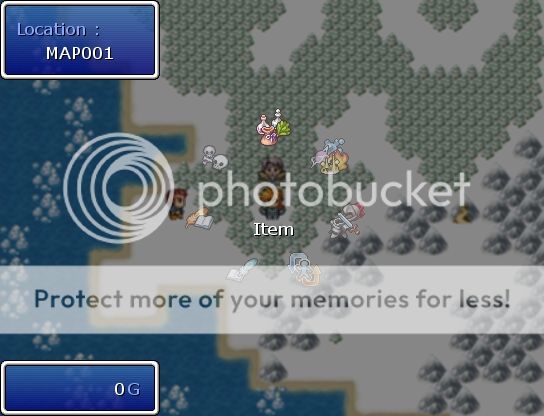
Et n'oubliez pas de télécharger les images nécessaires !
Les images proposées dans le sujet sont bonnes. Mais ces images aussi. Choisissez celles que vous préférez :
Images :
Spoiler (cliquez pour afficher)
Spoiler (cliquez pour afficher)
Merci encore Syvkal, pour ce magnifique script ^^
|
MMORPG : VX => http://www.rpg-maker.fr/scripts-342-net-gaming.html //\\ XP => http://www.rpg-maker.fr/scripts-425-netplay-master-script-mmorpg.html |
LES KONG -
posté le 01/02/2014 à 02:12:38 (49 messages postés)
| | cari914 j'ai un problème avec votre script à la ligne: 32
class Scene_Menu < Scene_Base
j'utilise rpg maker vx help!! please
| 
|
|
|




 Chat
Chat