|
Bienvenue
visiteur !

|
Statistiques
Liste des
membres
Contact
Mentions légales
325 connectés actuellement
29351035 visiteurs
depuis l'ouverture
6259 visiteurs
aujourd'hui



Partenaires


Tous nos partenaires
Devenir
partenaire
|

❤ 1Crystal Bonsoir à tous,
Je pense que l'ajout de la console aura été la plus grande innovation de RMVX Ace. Super pratique pour le débugage des scripts.
Et c'est pourquoi je n'ai pas pu résister à l'envie de personnaliser un peu ce formidable outil.
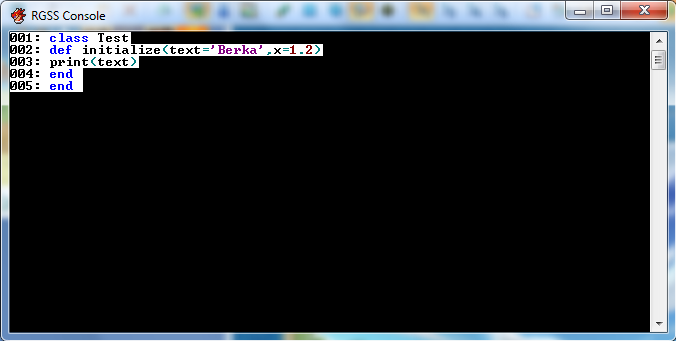
Grâce à ce script (mon premier sur Ace, faut bien vivre avec son temps) vous aurez la possibilité de colorer les chaines affichées par la consoles.
Cela permet également de faire un rapide outil de coloration syntaxique. Un screenshot parlant mieux de la question que des phrases:
Pour ce faire, copiez ce script tout en haut de la liste (Avant Vocab).
1
2
3
4
5
6
7
8
9
10
11
12
13
14
15
16
17
18
19
20
21
22
23
24
25
26
27
28
29
30
31
32
33
34
35
36
37
38
39
40
41
42
43
44
45
46
47
48
49
50
51
52
53
54
55
56
57
58
59
60
61
62
63
64
65
66
67
68
69
70
71
72
73
74
75
76
77
78
79
80
81
82
83
84
85
86
87
88
89
90
91
92
93
94
95
96
97
98
99
100
101
102
103
104
105
106
107
108
109
110
111
112
113
114
115
116
117
118
119
120
121
122
123
124
125
126
| #============================================================
# Advanced RGSS3 Console
# Berka https://www.rpgmakervx-fr.com
# v0.5 VX Ace only. 01-21-12
#
# Thanks to Azuma-01 for symbols and regexp matching
# Free of use. Please ask me before publishing anywhere.
#
# Add a basic syntax haighlighter to the default RGSS Console
# May cause a slight slowdown in the console display.
#------------------------------------------------------------
# Use Kernel#puts to activate the syntax highlighter.
# Kernel#print stays unchanged.$
# Console#gets extracts the input of the console
# use: eval(Console.gets) to script while testing.
#------------------------------------------------------------
# Change the color of the console:
# Console.color(H_RED) # Set the color of the console
# print("this text is red") # Text displayed in red
# Console.color = nil # Remove the coloration
#============================================================
module Berka
module Console
LINE_NUMBERS = true # Display line numbers ON/OFF
BACKGROUND = true # Display a white background ON/OFF
ENABLEPROMPT = true # Enable the gets command ON/OFF
PARSE_P = false # Enable parsing for Kernel#p function /!\
end
end
module Win32
GSH ||= Win32API.new('kernel32','GetStdHandle','l','l')
SCTA||= Win32API.new('kernel32','SetConsoleTextAttribute','ll','l')
end
module Highlighter
H_BLACK = 0x0000 # black
H_DBLUE = 0x0001 # dark blue
H_DGREEN = 0x0002 # dark green
H_DCYAN = 0x0003 # dark cyan
H_DRED = 0x0004 # dark red
H_DPURPLE = 0x0005 # dark purple
H_DYELLOW = 0x0006 # dark yellow
H_GREY = 0x0007 # grey
H_DGREY = 0x0008 # dark grey
H_BLUE = 0x0009 # blue
H_GREEN = 0x000a # green
H_CYAN = 0x000b # cyan
H_RED = 0x000c # red
H_PURPLE = 0x000d # purple
H_YELLOW = 0x000e # yellow
H_WHITE = 0x000f # white
H_INTENSITY = 0x0080 # background intensity
# Ruby's special words
H_KWORDS=["alias","begin","BEGIN","break","case","defined","do","else","elsif",
"end","END","ensure","for","if","in","include","loop","next","raise",
"redo","rescue","retry","return","super","then","undef","unless",
"until","when","while","yield","false","nil","self","true","__FILE__",
"__LINE__","and","not","or","def","class","module","catch","fail",
"load","throw"]
# Ruby's operators
H_OPERATORS=["=","+","-","/","*","%",'(',')','[',']','{','}','<','>','&','|',
',','!',"?",":",";",'.']
def self.parse(*args)
args.flatten.each{|l|
Console.color=nil
print("#{sprintf("%03d",$consolelines+=1)}:\s")if Berka::Console::LINE_NUMBERS
l.split(/ /).each{|e|
case e
when *H_KWORDS then Console.color=H_BLUE
when /^\d*[.]?\d+$/ then Console.color=H_DRED
when /\/.*\/(?:[imx]{,3})/ then Console.color=H_DPURPLE # by Azuma-01
when /^:.*$/ then Console.color=H_DYELLOW # by Azuma-01
when /^#.*$/ then Console.color=H_DGREEN # by Azuma-01
else
e.split(//).each{|f|
@s=!@s if r=(f=='"'||f=="'")
if(@s)||r;Console.color=H_DPURPLE
elsif f=~/^\d*[.]?\d+$/;Console.color=H_DRED
else
Console.color=(H_OPERATORS.include?(f)? H_DCYAN : H_BLACK)
end
print(f)
}
print(" ")
next
end
print("#{e} ")
}
}
print("\n")
end
end
include Highlighter
module Console
$consolelines=0 # Console lines counter
def self.init
@outhwnd=Win32::GSH.call(-11)
end
def self.color=(c=H_BLACK)
Win32::SCTA.call(@outhwnd,(c||=H_BLACK)|(Berka::Console::BACKGROUND ? 0x00f0 : 0))# rescue nil
end
def self.gets
$stdin.gets
end
end
Console.init
# Kernel#puts redefinition
def puts(*a)
a.each{|n|Highlighter.parse(*n)}
end
#Kernel#p redefinition
def p(*a)
Berka::Console::PARSE_P ? (a.each{|b|puts b.inspect}) : Kernel.p(*a)
end
# Kernel#gets
def gets
Console.gets
end |
L'utilisation est simple:
- la fonction puts active la coloration syntaxique, faites: puts("[1,2,3]")
- la fonction print est laissée telle quelle.
- pour changer de couleur d'affichage: Console.color = H_RED Vous trouverez les codes couleurs au début du script.
Merci de me demander la permission avant de copier ce script à droite à gauche. Tout simplement pour que je puisse moi-même assurer le support du système.
Berka
|

berka -
posté le 24/01/2012 à 23:58:29 (493 messages postés)
| planchant sur un script | Hop nouvelle version:
Merci à Azuma: ajout de la colo pour les regexp et pour les symboles.
1
2
3
4
5
6
7
8
9
10
11
12
13
14
15
16
17
18
19
20
21
22
23
24
25
26
27
28
29
30
31
32
33
34
35
36
37
38
39
40
41
42
43
44
45
46
47
48
49
50
51
52
53
54
55
56
57
58
59
60
61
62
63
64
65
66
67
68
69
70
71
72
73
74
75
76
77
78
79
80
81
82
83
84
85
86
87
88
89
90
91
92
93
94
95
96
97
98
99
100
101
102
103
104
105
106
107
108
109
110
111
112
113
114
115
116
117
118
119
120
121
122
123
124
125
126
| #============================================================
# Advanced RGSS3 Console
# Berka http://www.rpgmakervx-fr.com
# v0.5 VX Ace only. 01-21-12
#
# Thanks to Azuma-01 for symbols and regexp matching
# Free of use. Please ask me before publishing anywhere.
#
# Add a basic syntax haighlighter to the default RGSS Console
# May cause a slight slowdown in the console display.
#------------------------------------------------------------
# Use Kernel#puts to activate the syntax highlighter.
# Kernel#print stays unchanged.$
# Console#gets extracts the input of the console
# use: eval(Console.gets) to script while testing.
#------------------------------------------------------------
# Change the color of the console:
# Console.color(H_RED) # Set the color of the console
# print("this text is red") # Text displayed in red
# Console.color = nil # Remove the coloration
#============================================================
module Berka
module Console
LINE_NUMBERS = true # Display line numbers ON/OFF
BACKGROUND = true # Display a white background ON/OFF
ENABLEPROMPT = true # Enable the gets command ON/OFF
PARSE_P = false # Enable parsing for Kernel#p function /!\
end
end
module Win32
GSH ||= Win32API.new('kernel32','GetStdHandle','l','l')
SCTA||= Win32API.new('kernel32','SetConsoleTextAttribute','ll','l')
end
module Highlighter
H_BLACK = 0x0000 # black
H_DBLUE = 0x0001 # dark blue
H_DGREEN = 0x0002 # dark green
H_DCYAN = 0x0003 # dark cyan
H_DRED = 0x0004 # dark red
H_DPURPLE = 0x0005 # dark purple
H_DYELLOW = 0x0006 # dark yellow
H_GREY = 0x0007 # grey
H_DGREY = 0x0008 # dark grey
H_BLUE = 0x0009 # blue
H_GREEN = 0x000a # green
H_CYAN = 0x000b # cyan
H_RED = 0x000c # red
H_PURPLE = 0x000d # purple
H_YELLOW = 0x000e # yellow
H_WHITE = 0x000f # white
H_INTENSITY = 0x0080 # background intensity
# Ruby's special words
H_KWORDS=["alias","begin","BEGIN","break","case","defined","do","else","elsif",
"end","END","ensure","for","if","in","include","loop","next","raise",
"redo","rescue","retry","return","super","then","undef","unless",
"until","when","while","yield","false","nil","self","true","__FILE__",
"__LINE__","and","not","or","def","class","module","catch","fail",
"load","throw"]
# Ruby's operators
H_OPERATORS=["=","+","-","/","*","%",'(',')','[',']','{','}','<','>','&','|',
',','!',"?",":",";",'.']
def self.parse(*args)
args.flatten.each{|l|
Console.color=nil
print("#{sprintf("%03d",$consolelines+=1)}:\s")if Berka::Console::LINE_NUMBERS
l.split(/ /).each{|e|
case e
when *H_KWORDS then Console.color=H_BLUE
when /^\d*[.]?\d+$/ then Console.color=H_DRED
when /\/.*\/(?:[imx]{,3})/ then Console.color=H_DPURPLE # by Azuma-01
when /^:.*$/ then Console.color=H_DYELLOW # by Azuma-01
when /^#.*$/ then Console.color=H_DGREEN # by Azuma-01
else
e.split(//).each{|f|
@s=!@s if r=(f=='"'||f=="'")
if(@s)||r;Console.color=H_DPURPLE
elsif f=~/^\d*[.]?\d+$/;Console.color=H_DRED
else
Console.color=(H_OPERATORS.include?(f)? H_DCYAN : H_BLACK)
end
print(f)
}
print(" ")
next
end
print("#{e} ")
}
}
print("\n")
end
end
include Highlighter
module Console
$consolelines=0 # Console lines counter
def self.init
@outhwnd=Win32::GSH.call(-11)
end
def self.color=(c=H_BLACK)
Win32::SCTA.call(@outhwnd,(c||=H_BLACK)|(Berka::Console::BACKGROUND ? 0x00f0 : 0))# rescue nil
end
def self.gets
$stdin.gets
end
end
Console.init
# Kernel#puts redefinition
def puts(*a)
a.each{|n|Highlighter.parse(*n)}
end
#Kernel#p redefinition
def p(*a)
Berka::Console::PARSE_P ? (a.each{|b|puts b.inspect}) : Kernel.p(*a)
end
# Kernel#gets
def gets
Console.gets
end |
Bonne nuit,
Berka
|
Twitter: Pensées politiques et juridiques. Réflexions informatiques |
Tata Monos -
posté le 25/01/2012 à 20:21:27 (28 messages postés)
| Compte Non utilisé | Mise à jour du script.
|
Erwsaym -
posté le 27/01/2012 à 18:47:57 (137 messages postés)
| | Bien ça !Sa va aider les scripteur dans la visibilité pour leur futur script qui créeront !
|
madmanu -
posté le 16/02/2012 à 13:52:07 (85 messages postés)
| | ou est la dite console je savais pas qu'il y en avait une sur rpgmvx ace
| 
|
|
|




 Chat
Chat